Product Info
| Uses | Unlimited Domains |
| Source | Original Authors |
| License | GPL |
| Version | pixelyoursite-pro-core-12.6.7.zip |
| Last Updated | 29 Sept 2026 |
Get with Membership
Access 500+ products
Starter
₹799
5/day
Premium
₹1,299
10/day
Developer
₹1,999
15/day
Wordpress Plugins
PixelYourSite Pro (Core Plugin )
Choose Plan
ONE YEAR UPDATE
1 Year download access
₹399
LIfetime UPDATE
Lifetime download access
₹599
What You Get
Original GPL Licensed Files
Unlimited Domain Usage
Instant Download Access
Free Manual Updates
100% Clean & Virus Free
Secure Payment
Instant Access
Free Updates
Product Description
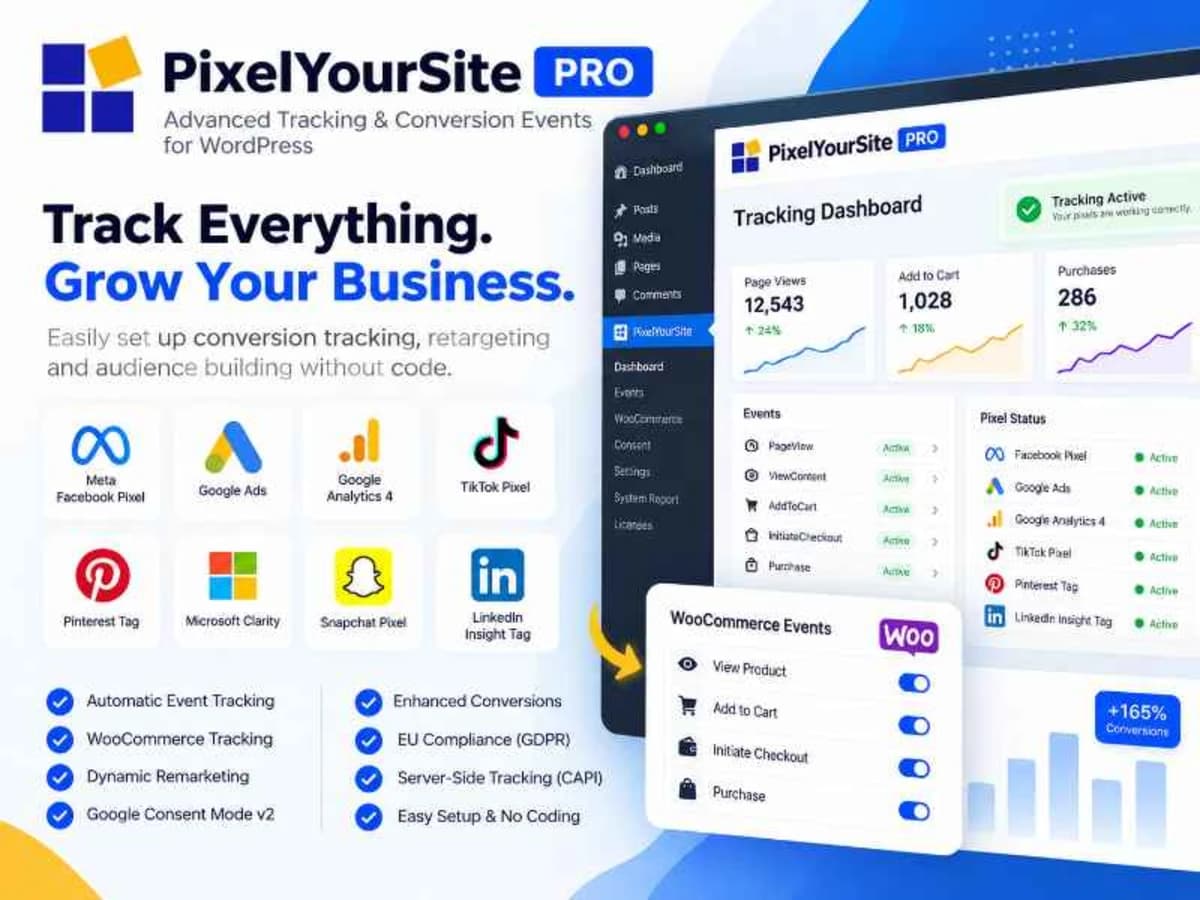
PixelYourSite Pro is a comprehensive tracking manager for WordPress. Instead of manually pasting half a dozen different scripts into your theme header or using a separate plugin for each platform, it gives you one centralized dashboard to manage all your pixels and tags.
It was built for store owners, marketers, and site managers who need reliable data from Facebook Pixel, Google Analytics, Google Ads, Pinterest Tag, Bing Ads, and any other custom script you need to fire. Rather than just inserting the base code, it handles the complex event tracking that usually requires custom coding – things like tracking purchases, lead forms, button clicks, and video views automatically. If you’re tired of wrestling with code snippets and trying to make Google Tag Manager fire correctly on WooCommerce events, this plugin simplifies that entire workflow into checkboxes and trigger settings.
Core Features and Why They Matter in Practice
What makes this plugin stand out is not just that it inserts pixels, but how intelligently it tracks user actions. Here are the features you’ll actually use day-to-day:
One Dashboard for Every Major Pixel
You can deploy and manage Facebook Pixel, Google Analytics (including GA4), Google Ads Remarketing, Pinterest, Bing, and any custom head/footer script from a single settings page. No need to edit theme files or juggle multiple header/footer plugins. This keeps your site leaner and prevents duplicate pixel fires which can ruin your ad data.
Complete WooCommerce and Easy Digital Downloads Tracking
For e-commerce, this is where it saves hours of development. It automatically tracks the entire funnel: ViewContent, AddToCart, InitiateCheckout, Purchase, and more, with correct dynamic values like product price, currency, and content IDs. It also handles variations, bundles, and refunds much more accurately than a manual implementation, which is critical if you run Facebook Dynamic Ads or Google Ads conversion tracking.
Automatic Event Tracking Without Code
You don’t need to write JavaScript to track important interactions. The plugin can automatically detect and fire events for link clicks, form submissions, video embeds, page scrolls, and even AdSense clicks. You just enable what you want to monitor, and it maps those actions to your configured pixels. It’s incredibly useful for building custom audiences based on engagement.
Custom Events With Flexible Triggers
When you need something specific, the custom event builder is very powerful. You can create your own events and decide exactly when they fire – on page visit with URL filters, on click of a specific CSS selector, on scroll depth, after a time delay, or on mouse-over. For example, you can fire a “Lead” event only when someone clicks a button with ID #book-call, or fire a Pinterest event after someone scrolls 70% down a sales page.
GDPR and Consent Integration
The plugin is built to respect cookie consent. It stays dormant until consent is given and integrates with popular consent banner plugins like CookieYes, Complianz, and Cookie Notice. You can configure it to require consent for each pixel individually, which helps you stay compliant without having to write custom blocking scripts.
WPML Language-Based Pixel Firing
If you run a multilingual site with WPML, you can control which pixels fire for which language. This is a small but vital feature for stores that advertise to different countries with different ad accounts – you can ensure your French traffic only triggers your French Facebook pixel and doesn’t pollute your main English pixel data.
Practical Use Cases Where It Makes a Difference
Running Paid Traffic to a WooCommerce Store
Imagine you are spending money on Facebook and Google Ads. Without accurate purchase data, you are optimizing blind. PixelYourSite ensures your Purchase event sends the exact order value, currency, and product IDs to both platforms, so your campaigns can find more buyers who look like your real customers. It also fixes common issues like duplicate purchases or missing AddToCart data on product variations.
Building Retargeting Audiences Without a Developer
A blogger or service business might want to retarget people who watched a YouTube video on the site, scrolled halfway through a pricing page, or clicked a contact form but didn’t submit. Instead of hiring a developer to add event listeners, you can set up those triggers in a few minutes and start building warm audiences in Facebook and Google for much cheaper follow-up ads.
Managing Multiple Client Pixels Cleanly
For freelancers managing sites for clients, pasting raw code into the theme is messy and hard to maintain. With this plugin, you can configure all tracking in one place, export/import settings, and hand over a clean setup that the client can understand. It also keeps all scripts organized, so when the client asks to add TikTok or Pinterest later, you just add another script field instead of touching code again. hhh
Product Details
Versionpixelyoursite-pro-core-12.6.7.zip
CategoryWordpress Plugins
LicenseGPL
Downloads0
Last Updated29 Sept 2026
What You Get
Original GPL Licensed Files
Unlimited Domain Usage
Instant Download Access
Free Manual Updates
100% Clean & Virus Free
GPL vs Original
| Feature | GPL | Original |
|---|---|---|
| Original Files | ✅ | ✅ |
| Unlimited Downloads | ✅ | ✅ |
| Unlimited Websites | ✅ | ❌ |
| One-Time Payment | ✅ | ~ |
| No License Key | ✅ | ❌ |
| Author Support | ❌ | ✅ |