Product Info
| Uses | Unlimited Domains |
| Source | Original Authors |
| License | GPL |
| Version | funnelkit-automations-pro-3.8.2.zip |
| Last Updated | 28 Sept 2026 |
Get with Membership
Access 500+ products
Starter
₹799
5/day
Premium
₹1,299
10/day
Developer
₹1,999
15/day
Wordpress Plugins
FunnelKit Automations Pro
Choose Plan
ONE YEAR UPDATE
1 Year download access
₹399
LIFETIME UPDATE
Lifetime download access
₹599
What You Get
Original GPL Licensed Files
Unlimited Domain Usage
Instant Download Access
Free Manual Updates
100% Clean & Virus Free
Secure Payment
Instant Access
Free Updates
Product Description
FunnelKit Automations Pro
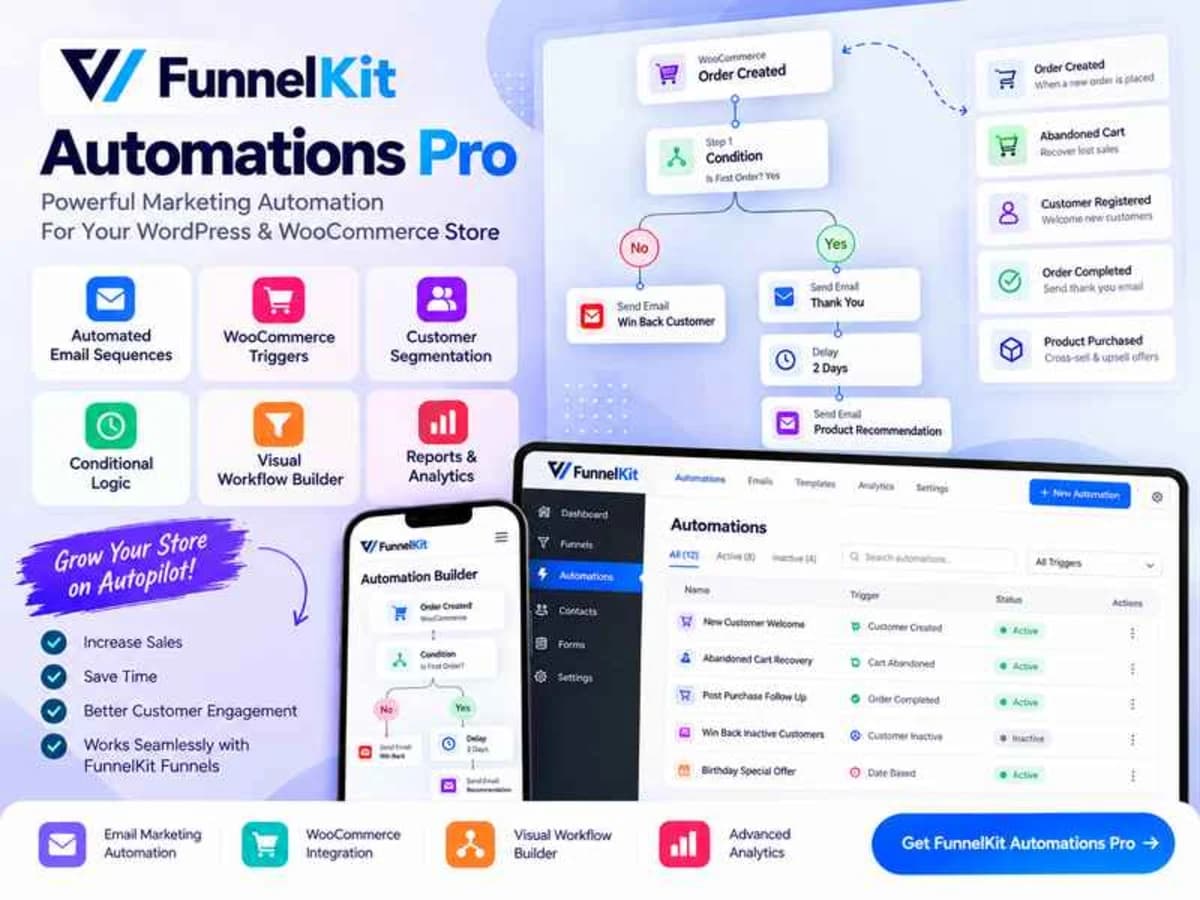
FunnelKit Automations Pro, which you might still know as Autonami, is a marketing automation plugin that lives directly inside your WordPress dashboard. Instead of paying a monthly fee for an external email platform like ActiveCampaign, Klaviyo, or Drip, it turns your own WordPress site into the automation engine.
It connects directly to WooCommerce and other popular plugins to watch for events — someone abandons a cart, completes a purchase, creates an account, finishes a course, or lets a subscription expire. When that event happens, it can trigger a whole sequence of actions without you having to do anything manually. For store owners, course creators, membership site owners, or anyone running WooCommerce, it solves the problem of having to juggle a separate CRM and patch up integrations with Zapier just to send a simple follow-up email.
Core Features and Why They Are Useful in Practice
1. WooCommerce Abandoned Cart Recovery
This is the core money-saving feature. The plugin tracks when a guest or logged-in user adds products to their cart but does not complete checkout. You can then automatically send a timed sequence — for example, an email after 30 minutes, a follow-up with a coupon after 24 hours. It captures emails at checkout early, so you can recover carts even from guests.
2. Visual Automation Builder
Everything is built in a drag-and-drop canvas inside WordPress. You start with a trigger like Order Created or User Registered, then add conditions, delays, and actions. Seeing the workflow visually makes it much easier to spot logic errors than trying to manage it with code snippets or multiple disconnected plugins.
3. Built-in CRM and Contact Management
The Pro version adds proper contact management. You can automatically apply tags, add people to lists, update custom fields, and create dynamic segments based on purchase history, total spend, or engagement. This lets you run most of the segmentation you would normally need an external CRM for, but your data stays on your own site.
4. Drag-and-Drop Email Customizer
WooCommerce default emails are very plain. FunnelKit includes a visual email builder to redesign your transactional emails — order confirmation, refund, login details — and your marketing emails with your own logo, colors, and product blocks. You can preview them before they go live, which helps keep branding consistent.
5. Broadcast Campaigns and Audience Segmentation
Beyond automations, you can send one-time broadcast emails to specific segments. For example, you can target only customers who bought a specific product in the last 60 days, or contacts with a certain tag. Combined with analytics on open rates and revenue attribution, it is very practical for promotions.
6. Deep Integrations With WordPress Ecosystem
The plugin connects natively with LearnDash, LifterLMS, Wishlist Member, AffiliateWP, WooCommerce Subscriptions, and more. You can also connect to external services like Zapier, Pabbly Connect, and Integrately. That means a course completion in LearnDash can tag a user and trigger a certificate email, or a new affiliate referral can start an onboarding sequence.
Practical Use Cases Where FunnelKit Automations Pro Helps
Recovering Lost Sales Without Manual Follow-Ups
Imagine you run a small WooCommerce store selling apparel. A customer adds two items to the cart, enters their email at checkout, but gets distracted. With FunnelKit, that event starts a quiet automation. An hour later they get a simple reminder with a link back to their cart, and the next day a second email with a small incentive. You are not checking reports daily — the system handles it.
Onboarding New Customers or Students Properly
For a store or a LearnDash course, the first few days after purchase determine if the customer will stick around. You can build a welcome sequence that sends immediately after signup: a thank you email on day zero, a how-to-get-started guide on day two, and a check-in on day five. For courses, you can trigger different emails based on lesson completion.
Increasing Repeat Purchases With Post-Purchase Flows
After someone buys a skincare product, for example, you can wait 20 days and then automatically suggest a refill. Or if someone buys a beginner course, you can tag them as an engaged learner and after a week pitch the advanced course. These post-purchase follow-ups are where most stores see a real lift in lifetime value.
Product Details
Versionfunnelkit-automations-pro-3.8.2.zip
CategoryWordpress Plugins
LicenseGPL
Downloads0
Last Updated28 Sept 2026
What You Get
Original GPL Licensed Files
Unlimited Domain Usage
Instant Download Access
Free Manual Updates
100% Clean & Virus Free
GPL vs Original
| Feature | GPL | Original |
|---|---|---|
| Original Files | ✅ | ✅ |
| Unlimited Downloads | ✅ | ✅ |
| Unlimited Websites | ✅ | ❌ |
| One-Time Payment | ✅ | ~ |
| No License Key | ✅ | ❌ |
| Author Support | ❌ | ✅ |