Product Info
| Uses | Unlimited Domains |
| Source | Original Authors |
| License | GPL |
| Version | cool-formkit-for-elementor-forms-1.5.6.zip |
| Last Updated | 28 Sept 2026 |
Get with Membership
Access 500+ products
Starter
₹799
5/day
Premium
₹1,299
10/day
Developer
₹1,999
15/day
Elementor Addons
Cool FormKit for Elementor Forms
Choose Plan
ONE YEAR UPDATE
1 Year download access
₹399
LIFETIME UPDATE
Lifetime download access
₹599
What You Get
Original GPL Licensed Files
Unlimited Domain Usage
Instant Download Access
Free Manual Updates
100% Clean & Virus Free
Secure Payment
Instant Access
Free Updates
Product Description
Cool FormKit for Elementor Forms
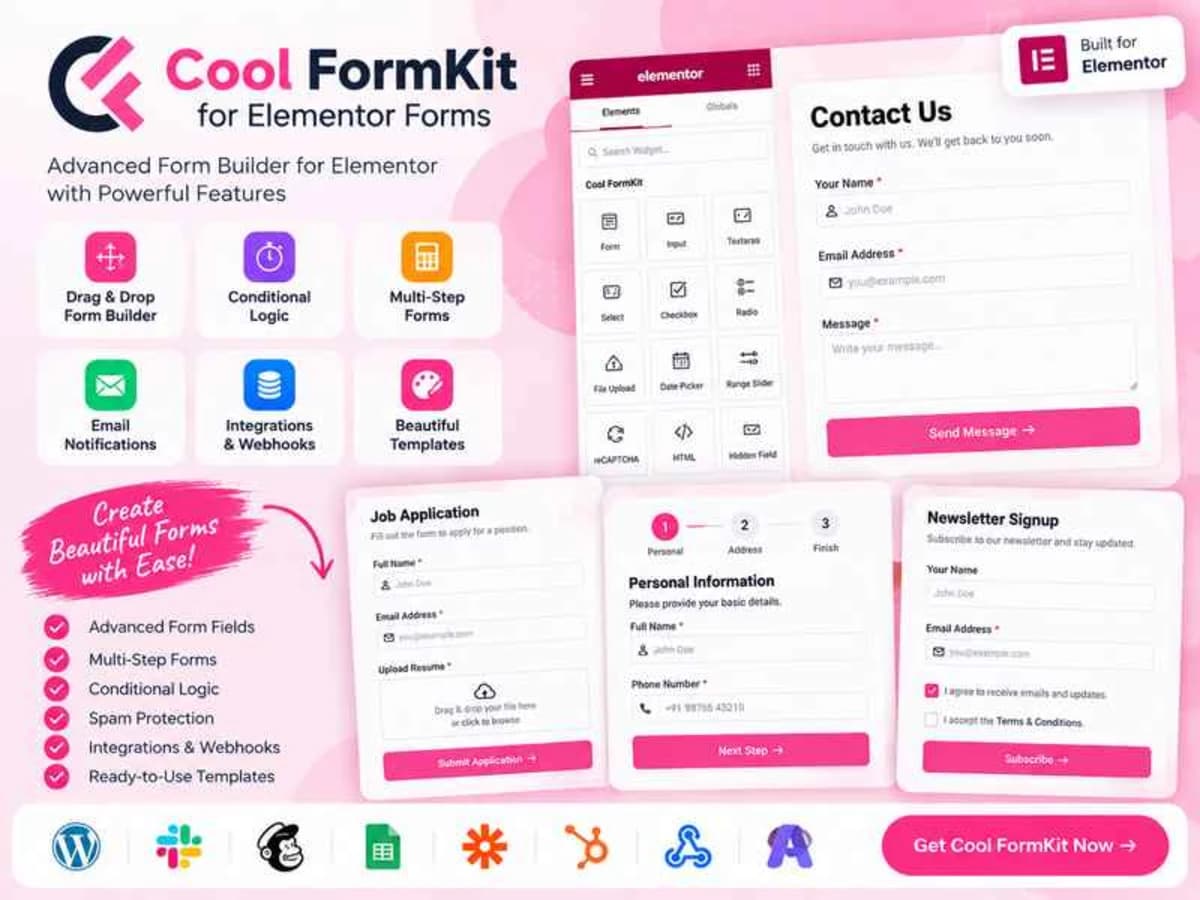
Cool FormKit is a practical add-on that fixes the biggest limitation of Elementor’s native form widget. Out of the box, Elementor Free doesn’t even give you a form widget, and even Elementor Pro’s form is pretty basic.
This plugin bridges that gap completely. It gives Elementor Free users a full drag-and-drop form builder inside Elementor, and for Pro users, it layers on the advanced field types and logic that you’d normally need a separate form plugin like WPForms or Gravity Forms for.
If you build lead generation sites, booking forms, or quote calculators for clients, this is meant for you. Instead of juggling a third-party form plugin and then struggling to make it match your Elementor design, everything stays native inside the Elementor editor. You keep the same styling controls, responsive settings, and theme consistency without extra shortcodes or iframe embeds.
Core Features & Practical Value
What I like about this plugin is that it doesn’t try to add 50 gimmicks. It focuses on the handful of features people actually request on real projects.
1. Conditional Logic That Just Works
This is the main reason most people install it. You can show or hide any field based on what the user selected in a previous field. For example, if someone selects “Business” under inquiry type, you can reveal fields for company name and budget. If they select “Personal,” those fields stay hidden. It keeps long forms short and relevant, which directly improves completion rates.
2. Form Builder for Elementor Free
If you are still on Elementor Free, this is huge. Cool FormKit unlocks a complete form widget so you don’t have to upgrade to Pro just to collect leads. You can create contact forms, application forms, and inquiry forms without paying for another plugin.
3. International Phone Field with Country Code
The phone field automatically adds a searchable country selector with flags and dial codes. It validates the number format based on the selected country and saves the full international number. If you get leads from multiple countries, this eliminates the messy “+1 / +44” confusion in your inbox.
4. Calculated Fields and Number Logic
You can create live calculation fields for quoting or booking. For instance, quantity x unit price, or distance-based pricing. The result updates instantly on the front end without page reload. Perfect for service businesses that need to give instant estimates.
5. Advanced Field Types
Beyond the standard text, email and textarea, you get specialty fields like range slider, signature pad, input masks, and address autocomplete. The signature field is especially useful for agreements and consent forms, while the masked input is great for forcing a specific format for things like phone numbers or IDs.
6. Complete Style Control Inside Elementor
Everything is styled from the Style tab you already know. You can control field spacing, label typography, border radius, focus states, button hover effects, and error messages without writing any CSS. The forms inherit your global fonts and colors but can be overridden per-form if needed.
Practical Use Cases: Where It Really Shines
Service Quote Forms That Filter Leads
Imagine a cleaning company site. The first question is “Property Type: Apartment, House, Office.” Based on that answer, you show relevant follow-ups — number of bedrooms for a house, or number of desks for an office — and then calculate an estimated price with a calculated field. The client only sees what’s relevant, and you get qualified details in your email.
Booking and Inquiry Forms for Local Businesses
For a salon, clinic, or car rental site, you can build a single-page booking request with date picker, time slots, and conditional logic for staff selection. Combined with the country-code phone field, you get clean, callable leads and fewer back-and-forth emails to confirm details.
Simple Lead Forms Without Leaving Elementor
If you are a freelancer building small business sites on Elementor Free, you no longer need to install a heavy form plugin just for a contact form. You can build a good-looking, spam-protected form with custom success messages and email routing, all from within the builder your client already understands.
Product Details
Versioncool-formkit-for-elementor-forms-1.5.6.zip
CategoryElementor Addons
LicenseGPL
Downloads0
Last Updated28 Sept 2026
What You Get
Original GPL Licensed Files
Unlimited Domain Usage
Instant Download Access
Free Manual Updates
100% Clean & Virus Free
GPL vs Original
| Feature | GPL | Original |
|---|---|---|
| Original Files | ✅ | ✅ |
| Unlimited Downloads | ✅ | ✅ |
| Unlimited Websites | ✅ | ❌ |
| One-Time Payment | ✅ | ~ |
| No License Key | ✅ | ❌ |
| Author Support | ❌ | ✅ |